STEP 01
Upload your Hotel Lobby AI cast
Add one clear portrait to each upload box. For Hotel Lobby AI, the first image supplies the left performer and the second supplies the right performer. Use one visible face per photo.
Hotel Lobby AI · SeaDance Effects
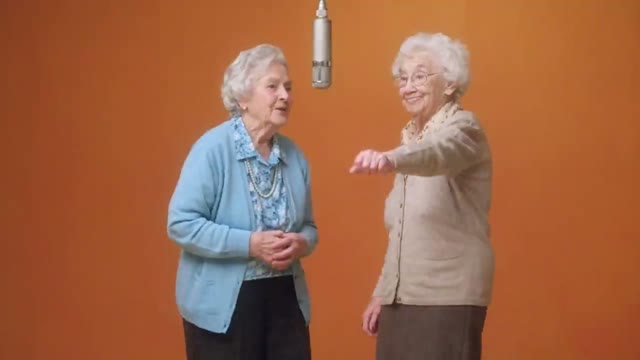
Make your own Hotel Lobby AI moment with SeaDance. Upload two portraits to replace the left and right performers in the template video. Hotel Lobby AI edits the existing clip, with instructions to keep its camera, choreography, orange booth, and audio. Add optional lyrics in Advanced.
Use 1–2 short lines, or label each part Left / Right. Leave blank to keep the template audio and performance. Custom lyrics change the vocals and lip movements; wording may vary.
0/240Video length and framing follow the template. Only the two performers' identities are replaced by default.
Upload both photos to create your Hotel Lobby AI video.
Discover the Hotel Lobby AI look through these reference clips. Try a familiar duo, a surprising partnership, or two versions of yourself. Each Hotel Lobby AI pairing starts with a different creative idea; your generated result will vary.
Reference examples from AIReel. Generated results vary.
Add one clear portrait to each upload box. For Hotel Lobby AI, the first image supplies the left performer and the second supplies the right performer. Use one visible face per photo.
Hotel Lobby AI uses the video shown in the preview as its source. The clip runs about 15 seconds, with its length and framing fixed to the template. Leave Advanced blank for a character replacement, or add lyrics to also change the vocals.
Check the displayed credit cost, then generate. Preview your Hotel Lobby AI result and download the clip. Hotel Lobby AI keeps the template aspect ratio; crop your downloaded clip in an editor for vertical sharing.

Separate references help describe each performer clearly. The Hotel Lobby AI edit assigns each photo to an existing performer and tracks that role throughout the source clip, so you do not need to combine your photos first.

The Hotel Lobby AI edit requests the original composition and camera movement. The template supplies both performers’ gestures and reactions; your portraits supply their identities.

Warm walls, studio lighting, and a suspended microphone are already in the Hotel Lobby AI source video. The edit requests that these stay unchanged while replacing the performers. Add an original verse in Advanced to customize the Hotel Lobby AI vocals too.

Cast friends or original human characters in Hotel Lobby AI. Clear faces help communicate the identities you want. Hotel Lobby AI requests the template costumes and body movements, so it works best with human portraits.
Choose sharp portraits with uncovered faces and visible hair. Similar lighting and camera angles give your Hotel Lobby AI duo a more consistent starting point. Hotel Lobby AI uses these for identity while requesting the original costumes and choreography. Avoid sunglasses, heavy blur, and crowded backgrounds.
Write a call-and-response in Advanced: label one line Left and the next Right. Keep your Hotel Lobby AI verse short so each performer has time to deliver their part.
Watch the whole Hotel Lobby AI clip for changing faces, crossed positions, or unusual hands. Try a clearer portrait or a shorter verse if needed. Crop the downloaded Hotel Lobby AI video for TikTok, Reels, or Shorts while keeping both subjects visible.
Yes. Open Advanced in the Hotel Lobby AI generator and write a short verse in your preferred language. Label lines Left and Right to assign the parts. Hotel Lobby AI requests vocals and matching mouth movement, but exact wording and lip sync can vary.
Hotel Lobby AI replaces the identities of two performers in the supplied template video. SeaDance submits the actual source clip and both portraits for editing, requesting the same orange booth, camera, timing, choreography, and costumes.
Hotel Lobby AI uses Seedance 2.5 video editing. The template is supplied as the source video, and the two portraits identify the replacements. Hotel Lobby AI locks output length and aspect ratio to the source instead of generating a new scene from photos alone.
By default, Hotel Lobby AI asks the model to preserve the audio already present in the template clip. Adding custom lyrics requests new vocals and adjusted mouth movements. Hotel Lobby AI does not guarantee an identical audio track or exact delivery of every word.
Hotel Lobby AI works best with clear human portraits because it replaces people in an existing clip. Human-like characters may work, but pets and very stylized faces may not fit the original performance. Likeness is not guaranteed.
Hotel Lobby AI uses your SeaDance credits. The generator shows the cost before submission, including processing the source video and the output duration rounded up for billing. The Hotel Lobby AI output itself follows the template length.
Hotel Lobby AI processing depends on the model queue and chosen settings. Follow the generation status in the workspace. When processing succeeds, preview the completed video and use its download control.
Yes. Add two portraits of yourself to Hotel Lobby AI using one upload box for each role. The two Hotel Lobby AI roles retain the template costumes and movements. You can give each role a different line in Advanced.
No. Hotel Lobby AI edits the actual template and requests unchanged choreography, audio, and framing, but it is still a generative edit. Identity details or parts of the scene can drift; review the whole Hotel Lobby AI result before sharing.
Pick two portraits and give Hotel Lobby AI your own personality. Your Hotel Lobby AI template is ready; leave Advanced blank to replace the characters, or add your own lyrics to change the vocals too.
Start Your Hotel Lobby AI Video